
I miscalculated a push-processed roll of Tri-X once. The resulting negatives were so dense they were nearly unprintable. That's when I decided to build DarkroomPro.
Film development is one of the few areas in photography where precision actually matters. Unlike digital post-processing where you can undo mistakes, chemical development is permanent. Get the timing wrong by even 30 seconds, and you've potentially ruined an entire roll of irreplaceable images.
The Problem with Development Charts
For decades, film photographers have relied on manufacturer datasheets and massive development chart compilations. These resources are valuable, but they cause real problems in the darkroom.
Development times are scattered across manufacturer datasheets, Massive Dev Chart, online forums, personal notes. You're searching through multiple sources while your film sits in developer. Most charts only give times for 20°C, but my basement darkroom runs cold in winter. Manual temperature compensation means consulting separate charts and doing mental math under dim safelight.
Push and pull processing makes it worse. Each stop of push requires different multiplicative factors. Different developers respond differently. Then you've got dilution calculations for concentrated developers. None of this is hard math, but it's easy to mess up when you're working in near darkness with a timer running.
Building DarkroomPro
I wanted a calculator that handled all these calculations instantly without requiring internet connectivity. Film photographers work offline by necessity. The darkroom doesn't have WiFi.
Building the database took longer than I expected. I started with the films and developers I actually use, then expanded based on what people requested. Currently at 36 film stocks and 17 developers covering 76+ tested combinations. Each entry uses manufacturer-verified times, not crowd-sourced guesses.
I chose Rust for the calculation engine. If you're not a developer, that just means I used a language designed for safety—it makes it mathematically impossible for the app to give you a wrong number due to a software glitch. It matches the precision we need in the darkroom. The UI is vanilla JavaScript to keep the app small and fast.
Interface Overview
DarkroomPro's interface is organized for quick access in darkroom conditions. Everything you need is visible without scrolling or hunting through menus.
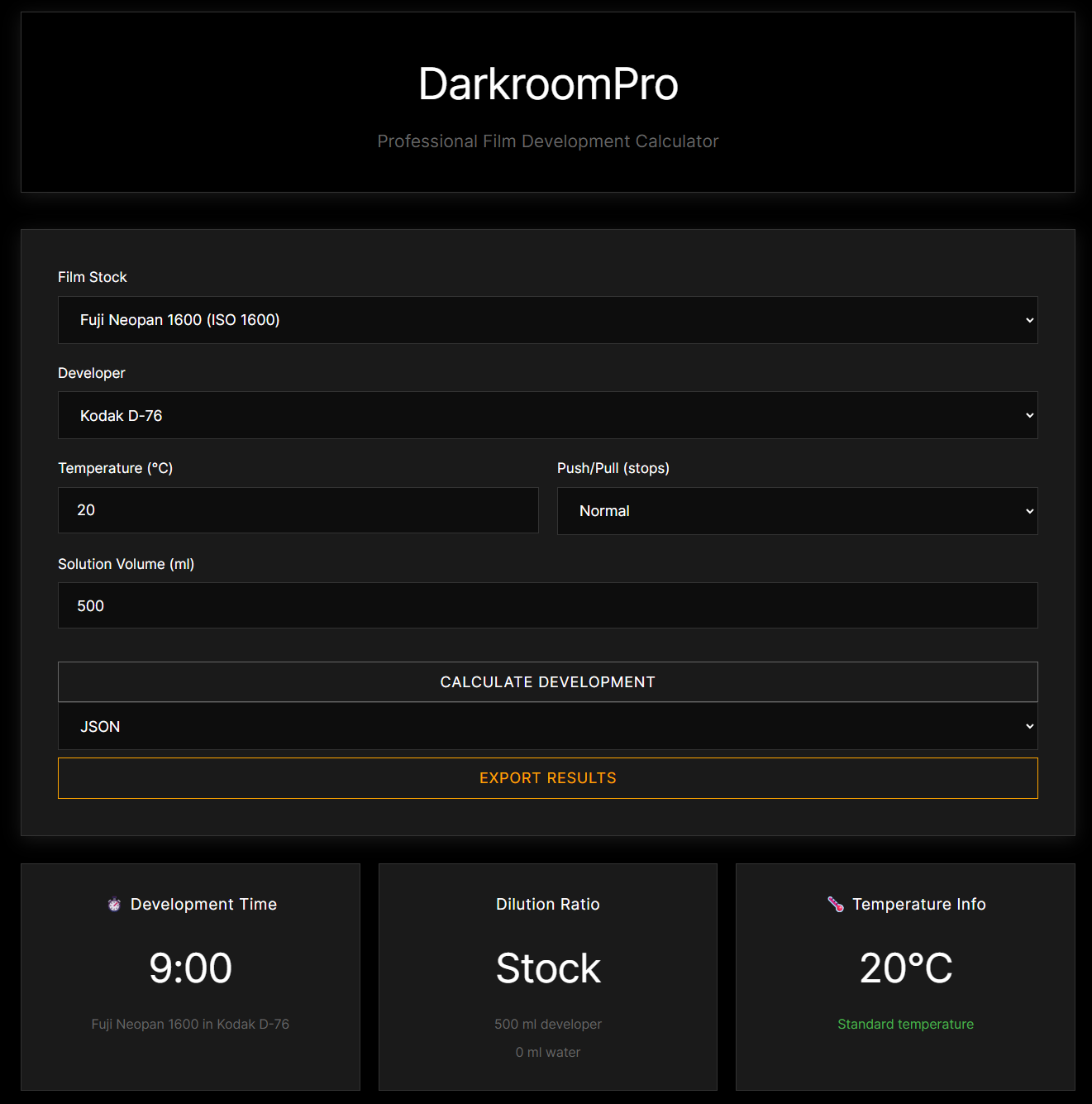
The main calculator interface showing film selection (Fuji Neopan 1600), developer choice (Kodak D-76), temperature and push/pull controls, with instant results for development time, dilution ratio, and temperature compensation.
The top section handles all your inputs: film stock selection from 36 options organized by manufacturer, developer choice from compatible options, actual temperature, push or pull processing adjustments, and solution volume. Hit calculate and you get three immediate results showing development time (accounting for temperature and push/pull adjustments), dilution ratio (both the ratio and exact amounts of developer and water), and temperature info that warns if you're outside the optimal range.
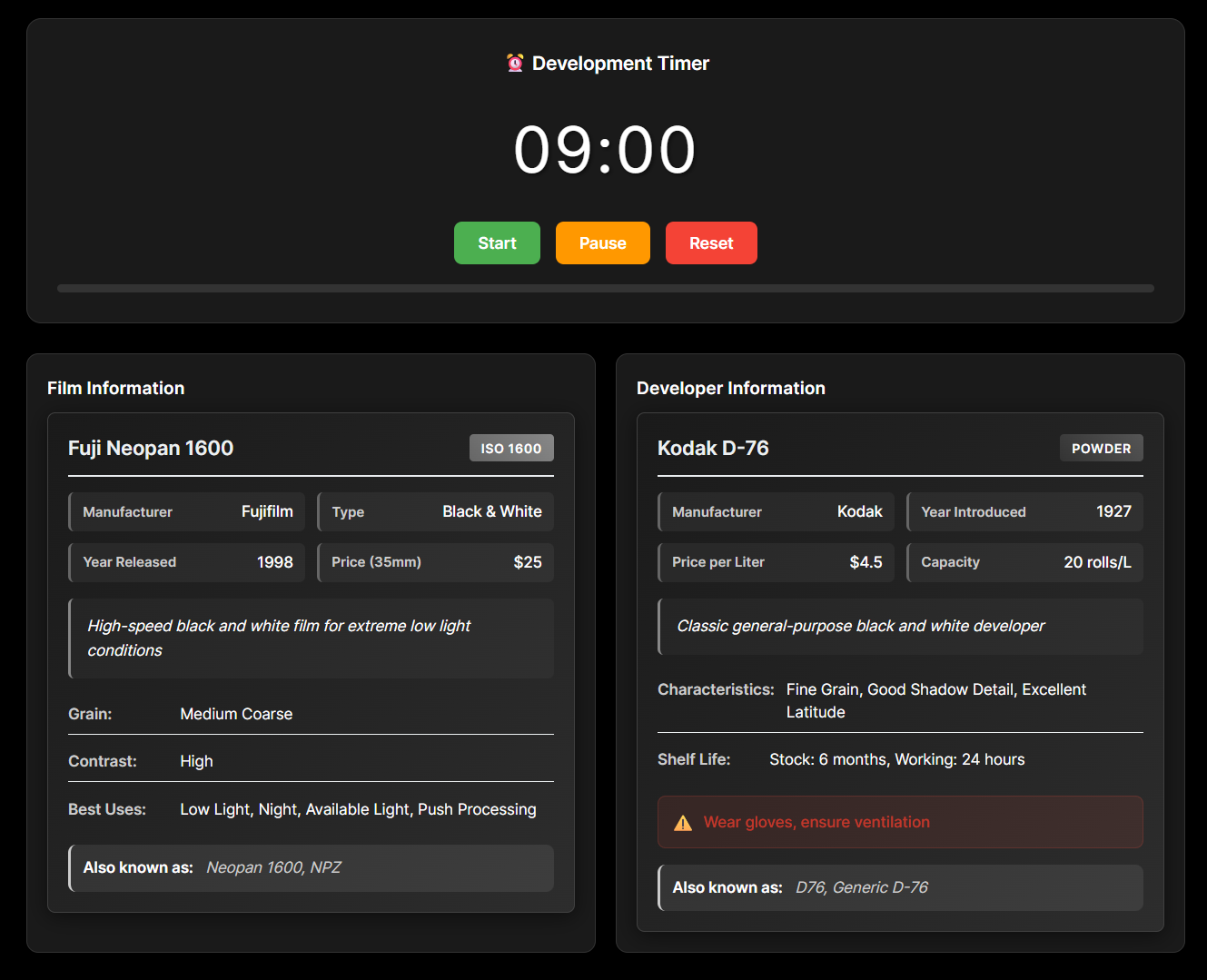
The integrated timer with Start, Pause, and Reset controls, plus comprehensive information panels showing detailed specs for both the film stock and developer.
The bottom section has the timer with Start, Pause, and Reset buttons. Audio alerts at 30 seconds and 10 seconds remaining. The progress bar changes color as time runs down—green when you have time, yellow at 30 seconds, red in the final 10 seconds.
Below the timer, information panels show film characteristics (manufacturer, ISO, type, release year, grain, contrast, best uses) and developer specs (manufacturer, year introduced, price, capacity, characteristics, shelf life, safety warnings). I added these because I was constantly looking up whether a developer needed special ventilation or how long opened bottles last.
Technical Architecture
The calculator uses a hybrid architecture. The core calculation engine is written in Rust, providing type-safe arithmetic with comprehensive error handling. Rust's ownership system prevents entire classes of calculation errors that could occur in dynamically-typed languages.
pub fn calculate_development_time(
    base_time: f64,
    temperature: f64,
    push_pull: i32,
    developer_factor: f64
) -> Result {
    // Temperature compensation using Q10 factor
    let temp_diff = 20.0 - temperature;
    let q10_factor = 1.0 + (temp_diff * 0.1);

    // Push/pull compensation
    let push_factor = match push_pull {
        -2 => 0.6,
        -1 => 0.75,
        0 => 1.0,
        1 => 1.35,
        2 => 1.75,
        3 => 2.25,
        _ => return Err(CalculationError::InvalidPushPull)
    };

    Ok(base_time * q10_factor * push_factor * developer_factor)
}
The UI is built with vanilla JavaScript. Without frameworks, the app loads faster and stays smaller. The application automatically detects whether running as a desktop app or in a browser, using the appropriate calculation backend for each environment.
The Database
The database includes the films and developers I actually use plus ones people kept requesting.
Tri-X 400 - I shoot this constantly. Works with D-76, HC-110, and Xtol. Pushes well to 1600.
HP5 Plus - More forgiving than Tri-X when you mess up exposure. My go-to for uncertain lighting.
T-Max 100 - Ultra-fine grain when you need it. The T-Max developer gives best results but it's finicky about temperature.
Delta 3200 - Actual speed is closer to 1000-1600 but it pushes well. The grain is prominent but that's expected at these speeds.
Portra 400 - Everyone shoots this for portraits. The database includes C-41 times for both standard and push processing.
Pro 400H - Discontinued, but I included legacy data because people still have frozen stock.
CineStill 800T - Cinema film adapted for still photography. Requires C-41 processing. The halation around lights is divisive.
Ektachrome E100 - Slide film needs E-6 processing which is temperature-critical. The database includes verified times for different E-6 kits.
The complete database has 36 films total: 13 black and white, 20 color negative, 3 slide films. Developer coverage includes 10 B&W developers, 4 C-41 kits, and 3 E-6 kits.
Note: Each film includes multiple developer combinations with verified push/pull data. Some combinations I've tested personally, others come from manufacturer data and trusted community sources.
Temperature Compensation
My darkroom temperature varies between 16°C in winter and 24°C in summer. DarkroomPro adjusts development times automatically for any temperature between 15°C and 30°C.
The traditional rule of thumb (roughly 10% time change per degree) is an oversimplification. Film development follows a logarithmic curve. DarkroomPro uses the Q10 factor method, a standard scientific calculation often used in chemistry to predict reaction rates. It's far more accurate than the simple linear estimate most charts use.
Below 20°C, development slows and you need longer times. Above 20°C, it accelerates and you need shorter times. The sweet spot is 18-22°C for consistent results. Outside of 15-24°C you risk uneven development. The calculator warns you when temperatures are getting risky.
Push and Pull Processing
Push processing compensates for underexposure by extending development time. Essential for low light or when you want higher contrast. Push +1 gives roughly 35% longer development. Push +2 is about 75% longer. Push +3 hits around 125% longer.
Pull processing does the opposite—shorter development to compensate for overexposure or control contrast in harsh lighting. Pull -1 cuts development by about 25%, pull -2 reduces it by 40%.
Different developers respond differently. HC-110 pushes well and maintains shadow detail, which is why I use it for concerts and low light work. D-76 is moderate but the grain gets rough at +2 or higher. Rodinal creates prominent grain increase but gives sharp acutance. Xtol maintains grain structure better than most when pushing.
I've pushed Tri-X to 3200 with HC-110. The grain is chunky but usable. Same push with D-76 looked worse.
The Built-in Timer
I added the timer because I got tired of using my phone timer in the darkroom. The screen brightness would ruin my dark adaptation.
The progress bar is color-coded: green when you have time, yellow at 30 seconds remaining, red in the final 10 seconds. Sound notifications at 30 and 10 seconds matter when you're working in dim safelight and can't always see the screen.
The display shows whole seconds only. No decimal places. In practice, precision beyond one second is meaningless. You can pause if needed—development can handle brief pauses under 10 seconds without ruining the film.
Dilution Calculator
Concentrated developers require precise dilution. DarkroomPro calculates exact amounts based on your solution volume.
Take a 500ml solution at 1:31 dilution (HC-110 Dilution B). You need 15.6ml of developer and 484.4ml of water. The calculator shows both the ratio and the precise amounts needed.
Export Functionality
Professional darkroom work requires documentation. DarkroomPro exports calculation results in multiple formats.
JSON export provides structured data for integration with other tools or personal databases. CSV export works with spreadsheets for tracking multiple rolls and analyzing development patterns over time. Text reports give you human-readable summaries suitable for printing or saving as darkroom notes.
{
  "film": "Kodak Tri-X 400",
  "developer": "HC-110 (Dilution B)",
  "temperature": 20,
  "push_pull": 1,
  "development_time": "10:40",
  "dilution_ratio": "1:31",
  "timestamp": "2026-01-29T14:30:00Z"
}
Cross-Platform Distribution
| Platform | Format | Installation |
|---|---|---|
| macOS | Universal DMG | Apple Silicon + Intel |
| Windows | MSI Installer | 64-bit |
| Linux | DEB / RPM | Debian, Ubuntu, Fedora |
All versions work offline and use the native Rust calculation engine for guaranteed precision. No internet connection required in the darkroom.
Real-World Usage
That concert I mentioned earlier: shot Tri-X at ISO 1600 (pushed +2 stops), developed in HC-110 Dilution B at 21°C.
DarkroomPro calculated 10:45 development time after accounting for temperature. Dilution came out to 15.6ml HC-110 plus 484.4ml water for my 500ml tank. Timer alerted me at 10:15 and 10:35.
The negatives came out dense enough for good shadow detail without blocking highlights. Grain was acceptable for a +2 push. Without the calculator, I probably would have messed up either the temperature compensation or the dilution ratio.
I've also used it for:
- T-Max 100 in T-Max developer at 19°C (my basement runs cold)
- HP5 Plus pushed to 1600 in Microphen
- Portra 400 pushed +1 in C-41 (required adjusting standard process times)
- Delta 3200 in DD-X at various temperatures
The export feature is useful for keeping records. I export to CSV and track patterns over time. Helps identify when I'm consistently over or underdeveloping.
Why Precision Matters
Film development is permanent. You can't undo it, adjust it later, or reshoot most situations.
Underdeveloped negatives are thin with poor shadow detail, difficult or impossible to print with adequate contrast. Overdeveloped negatives block highlights and create excessive grain while losing tonal separation in bright areas. Wrong temperature or agitation creates uneven development with density variations across the negative. Wrong dilution leads to unpredictable results and wasted chemistry.
I've ruined enough rolls from calculation errors to know this matters. DarkroomPro eliminates the mental arithmetic so I can focus on the actual craft—proper agitation technique, loading the reel correctly, maintaining consistent temperature.
Download DarkroomPro
Film development is stressful enough without trying to do mental math in the dark. I built DarkroomPro so I could stop worrying about the numbers and just focus on not dropping the film reel.